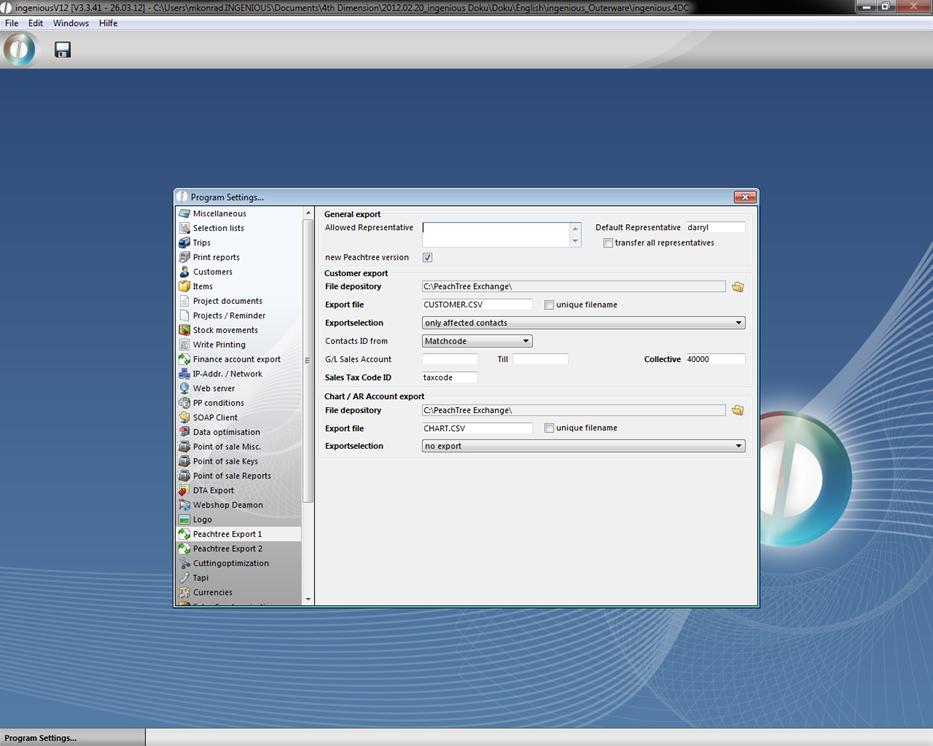
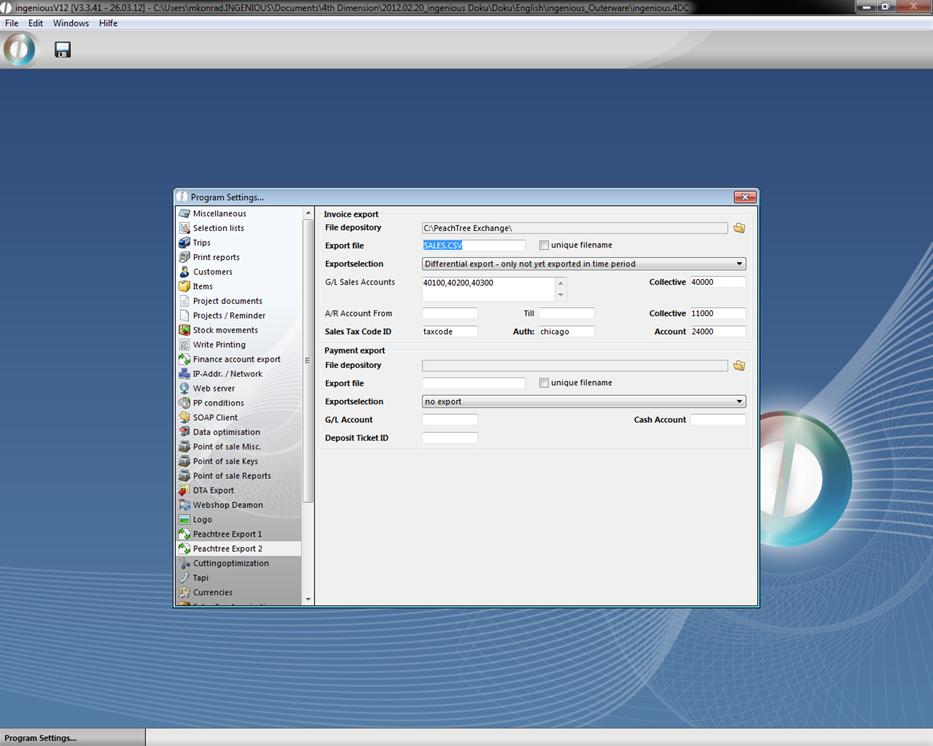
In this column you will find all the settings for Peachtree functions. The menu items for configuration and export only are visible when one has the module rights as well as the export rights. The Peachtree Export interface consists of a contact export, an invoice export and an export for GL Sales / AR accounts. The default settings for the various export models found in this column will be described in table format as follows.
|
Area |
Entry |
Comments |
|
Customer export |
File depository
|
Target path, in which the Peachtree-contact file should be filed. The setting occurs by means of the button to the right of the text field. |
|
|
Export file
|
Information on the file name of the contact file: The file name “CUSTOMER.CSV” preset in Peachtree should be used. |
|
|
Unique export file name
|
This checkbox must be selected if the file should have a unique file name with every creation of a single file. The file name then has the form: Customer_JJJJMMDDSSMMSS.CSV. |
|
|
Export selection
|
Setting possibilities are “All contacts” / “Only contacts that apply”. With the setting “All contacts”, all contacts will transfer from the Ingenious database to Peachtree. With the setting “Only contacts that apply”, only contacts are transferred to Peachtree that have final closed invoices or credits in a set time frame. |
|
|
Accounts receivable from … to …
|
In the fields, “Accounts receivable from” and “Debit account to”, the parameter of the permissible debtors export accounts is given. If the accounts receivable number of a contact lies within the parameter, the accounts receivable number will transfer as a GL Sales (Sales) account of the Peachtree contact. With the import, the GL Sales Accounts have to be created in Peachtree. |
|
|
Customer collective invoice
|
If the accounts receivable lies outside the parameter “Accounts receivable from” – “to” or if it is not assigned to an accounts receivable account number, the collective account will transfer over for this contact as a GL Sales (Sales) account. The preset standard value in Peachtree is “40000” at most. |
|
|
Sales tax code ID
|
In the Sales tax code ID field, the sales tax ID that is preset in the Peachtree ID must be entered. This ID will transfer for all customers and determines the sales tax rate. |
|
Invoicing export |
File attachment
|
The target path in which the Peachtree invoicing file should be filed. The setting occurs by means of the button to the right of the text field. |
|
|
Export file
|
Information on the file name of the invoicing file: The file name preset in Peachtree “SALES.CSV” should be used. |
|
|
Unique export file name
|
This checkbox must be selected if the file is to have a unique file name with every creation of a single file. Then the file name has the format: SALES_JJJJMMDDSSMMSS.CSV. |
|
|
Export selection
|
Setting possibilities are “Complete export – all in a time period” / “Difference export – not yet exported in the time period”. With the setting “Complete export” – all in the time period” all closed invoices and credits are exported that lie within the timeframe provided. With the setting, “Difference export – not yet exported in the time frame” only closed invoices and credits are exported that lie within the given time frame, but that were not exported before. |
|
|
Permissible article accounts
|
In the permissible article accounts field, a list separated by a comma can be given by Article-FIBU proceeds accounts. These account numbers will transfer together with the invoicing positions as a GL sales (sales) account number. With the import, the GL sales accounts must be created in Peachtree. The export of the articles proceeds accounts to the positions is optional. |
|
|
Standard article account
|
If the FIBU proceeds of an article is not shown in the list of the permissible article accounts, or if no accounts receivable account number is assigned to the article, then the collective account will transfer for this position as a GL Sales (Sales) account. The preset standard value in Peachtree is mostly “40000”. The export of the article proceeds account for the positions are optional. |
|
|
Accounts receivable from … to …
|
In the fields, “Accounts receivable from” and “Debit account to”, the parameter of the permissible debtors export accounts is given. If the accounts receivable number of a contact lies within the parameter, the accounts receivable number will transfer as a GL sales (sales) account (accounts receivable) of the Peachtree contact. With the import, the GL sales accounts have to be created in Peachtree. |
|
|
Accounts receivable collective invoice
|
If the accounts receivable lies outside the parameter “Accounts receivable from” – “to” or if an accounts receivable number is not assigned to a project, the collective account will transfer as a GL sales account (accounts receivable). The preset standard value in Peachtree is “11000” at most. |
|
|
Sales tax code ID
|
In the sales tax code ID field, the sales tax ID preset in Peachtree must be entered. This ID will transfer for all invoices and is fixed at the recalculation of the sales tax rate. |
|
|
Sales tax code authority ID
|
Every sales tax code can exist of several partial tax rates in Peachtree. Each one of these partial tax rates is given by an authority ID and is bound to the tax code ID. With Ingenious.V12 Peachtree Export version 1.0, only one authority ID can be transferred. |
|
|
Sales tax code account
|
Every sales tax code ID is assigned to a G/L account. |
|
CHART / AR Account Export |
File depository
|
The target path in which Peachtree Export files are to be saved. The settings occur by means of the button to the right of the text field.
|
|
|
Export file
|
Information on the file name of the export file: The file name preset in Peachtree “CHART.CSV” should be used. |
|
|
Unique export file name
|
This checkbox must be selected if the file should have a unique file name with every creation of a single file. Then the file name has the format: CHART_JJJJMMDDSSMMSS.CSV. |
|
|
Export selection
|
Setting possibilities are “GL sales accounts of all customers” / “GL sales account of customers that apply” / “GL sales account and AR project accounts” / “GL sales account and AR accounts of customers and projects from a time period”. With the setting “GL sales account of all customers” the accounts receivable numbers of all customers are exported. With the setting “GL sales account of affected customers” the accounts receivable numbers of all customers who show closed invoices or credits in the set search period are exported. With the setting “GL sales account and AR project accounts” the proceed accounts of the projects and the FIBU proceed amounts of the selected articles are exported. With the setting “GL sales account and AR accounts of customers and projects from a time period “the accounts receivable numbers of all customers, the proceed accounts of the projects and the FIBU accounts of the selected articles are exported. (Summary of two previous items). |
|
Export General |
Allowed representatives
|
In the allowed representatives field, a list separated by a comma can be given of the representatives who should be exported with the projects / contacts. During the import, these representatives must be created as a sales rep (employee). |
|
|
Standard representative ID
|
If a representative is not included in the list of the permissible representatives, or is not assigned to a project / contact, the standard representative will be transferred instead. The export of the representatives is optional. If no representatives are added in Peachtree, both fields – permissible representatives and standard representatives must be empty. In this case, no representatives are transferred. |
|
|
All representatives transferred
|
If this checkbox is selected, all representatives are listed in the contacts or the projects. The fields “Permissible representatives” and “Standard representatives” are ignored. |
|
|
New Peachtree version
|
Newer Peachtree versions (i.e. Peachtree 2007) require an expanded export file. The standard export for Peachtree version 7 is not sufficient for an import. |